The missing CLI for PostgreSQL.
retrofit checks each schema change, advises on its risks, and records it or stops it. Given any point in that history, it writes the schema; given two, the migrations between them, forward and reverse. Plain text in your repository, reviewed like code.
$ retrofit op add RenameColumn track.name title -qnote: schema-context: chinook+ b3dd32e3b701 RenameColumn chinook.track.namewarning: apply-risk-rename-in-use: renaming column "chinook.track.name" breaks readers still using the old name
$ retrofit migrate -qq | grep '^ALTER'ALTER TABLE chinook.track RENAME COLUMN name TO title;$ retrofit migrate --down -qq | grep '^ALTER'ALTER TABLE chinook.track RENAME COLUMN title TO name;
retrofit op add records a rename as one line, with a warning for code that still reads the old name. retrofit migrate writes the SQL from that line, and with --down, its reverse. Details in the demo.Every schema change recorded, checked and written to SQL.
No more hand-written migrations. Just describe the change using retrofit.
Oplog. retrofit appends one line per change to a plain text file in your repository. That file is the whole history of your schema, and git diffs it like any other.
Advisories. Record a change that would scan or lock a table, break code still reading an old name, or lose data, and retrofit prints an advisory before any migration runs.
Reverse. From one recorded line, retrofit writes the forward migration and, with --down, the reverse from the same line. Nobody writes the undo by hand.
Identity. Every table, column, index and constraint gets a number at creation, and the record names it by that number. A rename, type change or move changes nothing that points at it.
Snapshot. The whole schema as CREATE statements, in the format pg_dump --schema-only writes, so it fits anywhere a schema dump already does.
Seal. Place one anywhere in the record and every line before it becomes tamper-evident: an edit to any of them surfaces the next time retrofit reads the file.
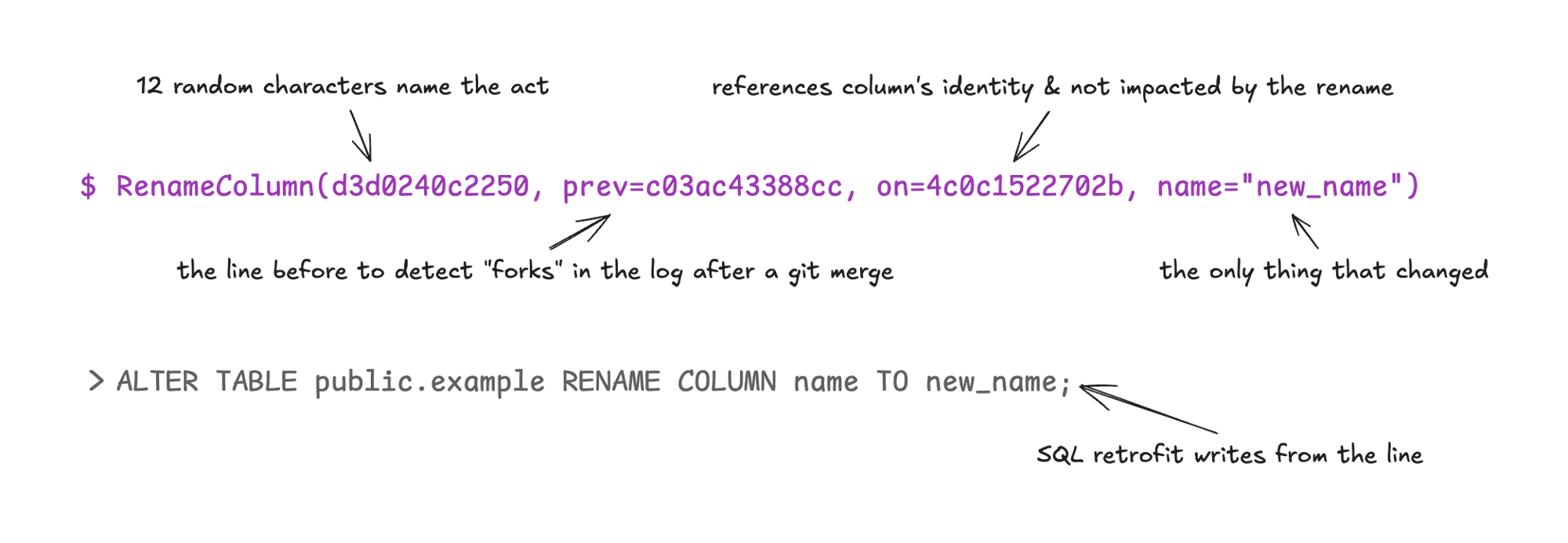
RenameColumn(d3d0240c2250, prev=c03ac43388cc, on=4c0c1522702b, name="new_name")d3d0240c2250 12 random characters that name the act.
prev= The line before, to detect forks in the log after a git merge.
on= References the column's identity, which the rename does not change.
name= The only thing that changed.
ALTER TABLE public.example RENAME COLUMN name TO new_name;on= is the one the AddColumn line gave this column when it was created.You know what a change will cost before it runs.
The risks come back on the line you recorded, and so does the undo.
- 01
The warning, on the line
Record a rename and retrofit says what it breaks, before any SQL.
$ retrofit op add RenameColumn track.name title -qnote: schema-context: chinook+ b3dd32e3b701 RenameColumn chinook.track.namewarning: apply-risk-rename-in-use: renaming column "chinook.track.name" breaks readers still using the old name
- 02
The undo, from the same line
migrate --downwrites the reverse of the change you recorded. Where it cannot bring the data back, the line says so.$ retrofit migrate --down --from seal --at last -q-- engine: postgres 17-- assumes database is at eee5eec0d6bb-- envelope: own; apply this file outside any open transaction-- reverse-unrecorded: this script is unrecorded: the oplog does not record the reverse it applies. The database sits at 834641d0b036.-- data-loss-on-apply: rows in column chinook.track.composer will be discarded when the snapshot is applied.
- 03
The stop, before anything runs
Not every change can be undone with its data. A one-line check in the Makefile reads that line and stops the run.
! retrofit migrate --down --from seal --at last -q | grep '^-- data-loss-on-apply:'note: reverse-unrecorded: this script is unrecorded: the oplog does not record the reverse it applies. hint: catch the oplog up with `retrofit op remove` or `retrofit op revise` of the window's operations, then `retrofit drift` for what remains.warning: data-loss-on-apply: rows in column chinook.track.composer will be discarded when the snapshot is applied. hint: capture the affected rows before applying, or re-shape the change to preserve them-- data-loss-on-apply: rows in column chinook.track.composer will be discarded when the snapshot is applied.make: *** [db-up] Error 1
The warning, the undo and the stop all came from the one line you recorded, before any migration file existed.
A text file in git, reviewed like code.
The schema change travels in the same commit as the code that needs it. Your team reviews, merges and deploys it the same way.
$ retrofit reconcile --all --clean -qnote: matrix verdict: both orders clean; chose --keep (default bias)reconcile diff for fork at f465: before: f4c199c97c80 RenameColumn name="title" eae20cbe51a7 AddColumn name="download_count" type="integer" after: f4c199c97c80 RenameColumn name="title" eae20cbe51a7 AddColumn name="download_count" type="integer"next: `git add <oplog> && git commit` to lock this state, or `git restore <oplog>` to revert.
retrofit reconcile chose an order, made the tail one straight line again, and left the commit to you. Details in the demo.Pull requests. A schema change arrives in a pull request as one added line, in the same commit as the code that reads it.
Two branches. Git keeps both branches’ lines, and retrofit reconcile orders them or reports a conflict.
Identify. retrofit identify reads a dump of a database and names the point in the record that database is at.
Scripts. Every command prints one JSON object per line under --as=json, so a pipeline reads it without parsing prose.
Start with your existing database and migration stack.
Import. retrofit import reads a schema dump from pg_dump, or the migration scripts already in your repository, and records each statement as one line.
Drift. When a database has moved without the record, retrofit drift reads a dump of it and records what changed.
$ retrofit import db/structure.sql --ddl-only --seal -q | grep '^imported'imported 52 ops; skipped 7 statements (3 sequences, 3 AlterSeqStmt, 1 declined by --ddl-only) [decision 6, preserved 1]
retrofit import on a Rails schema, read from the db/structure.sql that pg_dump writes. Details in the demo.Compatible with your existing migration runner: retrofit writes the migration, and the runner you already have applies it.
Recorded walkthroughs: Flyway, Liquibase, Rails, plain PostgreSQL.
- Database connection
- none; SQL to standard output; your pipeline applies it
- Undo command
- none; the record is a text file in git; git recovers it
- Colour, emoji
- none; every byte passes
grep,jqand a screen reader - Input
.sql: apg_dump --schema-only, migration scripts in order, or changes authored withop add- Record
- plain text; three header lines; one line per change:
RenameColumn - Output
- canonical DDL on stdout, shaped like
pg_dump --schema-only; migrations forward or--down; NDJSON under--as=json - Identity
- ElementID, 48 bits, minted at creation; unchanged by rename, cast and move
- Integrity
sealpins a Merkle digest; an edit surfaces at the next read- Writes
- atomic: tempfile, fsync, rename
- Exit codes
- 0, 1, 2, 3, 130
- Status
- pre-release